Guided screenshots, not live forms. Fictional public-demo data. No production account, live AI, email delivery or money movement.
Guided work Step 11 of 33
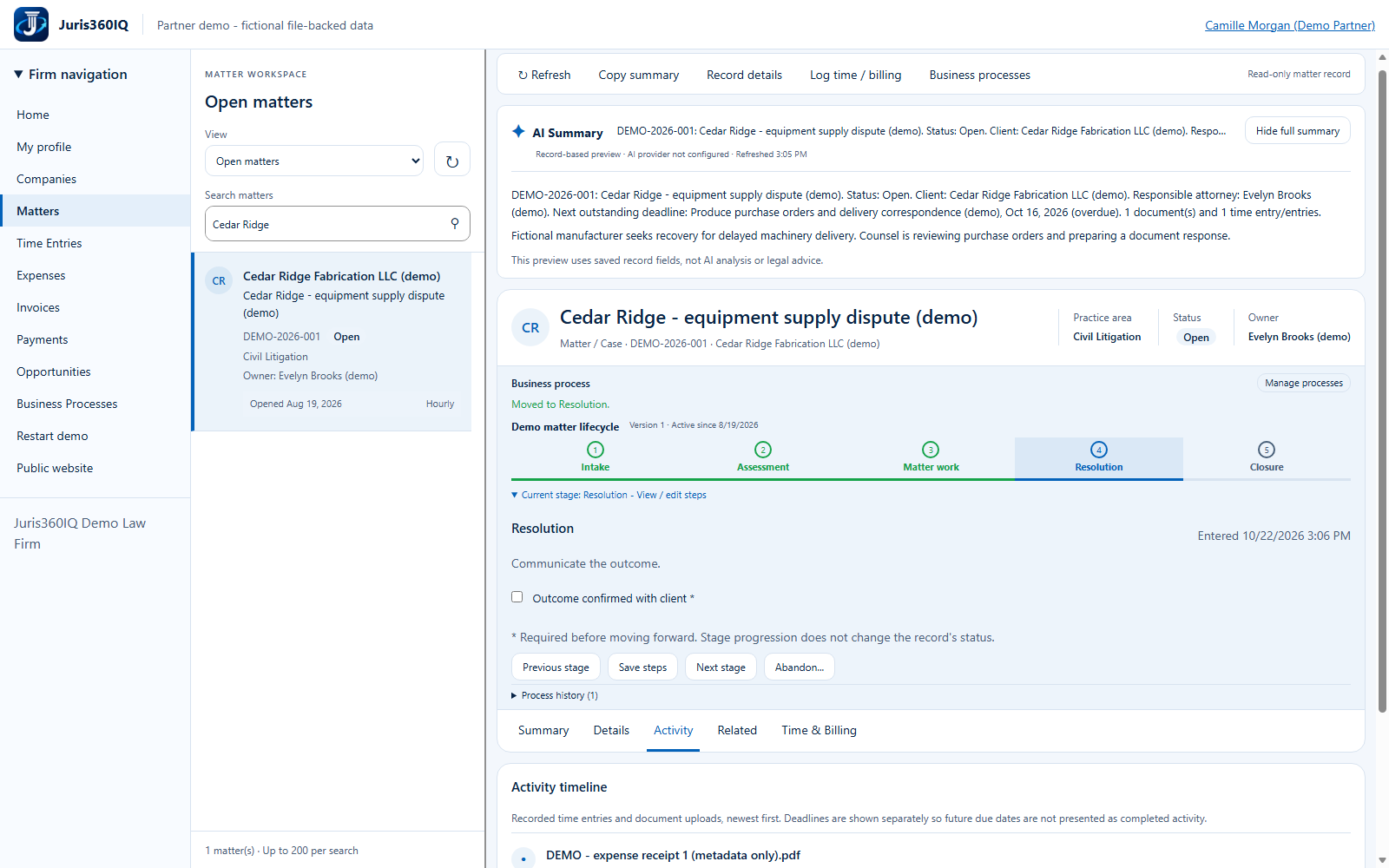
Verify the recorded move to Resolution
Your action
Confirm Resolution is the active stage. The matter remains Open and the overdue deadline is not cleared. Click Companies to review the client.
Highlighted controls
- Resolution is the active process stage
- Open the client workspace
Value to the firm
A visible stage rail supports clear handoffs without hiding the difference between workflow progress and case status.
Presenter notes: purpose, business value and limitations
The demo successfully saved the required confirmation and advanced from Matter work to Resolution. This is a process-state change only. The screenshot is the actual post-action state. Do not imply that a settlement occurred, a client was emailed or a court deadline was satisfied.
Business value: A visible stage rail supports clear handoffs without hiding the difference between workflow progress and case status.