Guided screenshots, not live forms. Fictional public-demo data. No production account, live AI, email delivery or money movement.
Billing review Step 25 of 33
Review selected work and the exact total
Your action
Select the $437.50 time entry and $85 courier expense. Enter tax $0 for this example and the client-facing note shown. Confirm the $522.50 total, then click Create draft invoice.
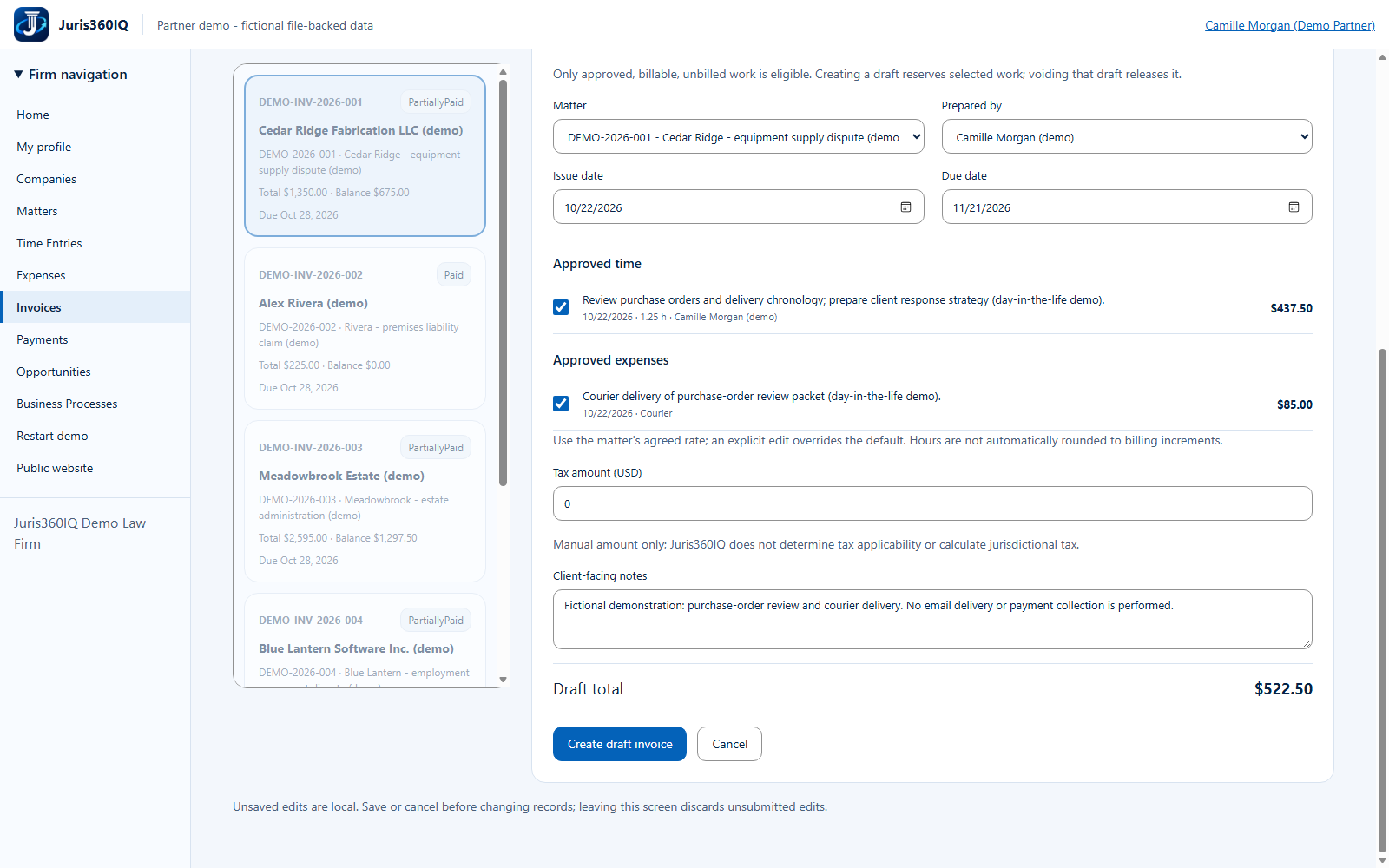
Highlighted controls
- Select the approved time AND courier expense
- Manual example tax: $0
- Verify total: $522.50
- Enter the fictional client-facing note
- Create the draft invoice
Value to the firm
Selecting approved sources rather than retyping line items reduces arithmetic mistakes and double billing.
Presenter notes: purpose, business value and limitations
The approved time is 1.25 hours at $350, totaling $437.50. The approved reimbursable courier cost is $85. The draft total is therefore $522.50 with manually entered zero tax. Juris360IQ does not calculate tax applicability. Creating the draft reserves these sources; a voided draft would release them. We do not void this invoice in the scenario.
Business value: Selecting approved sources rather than retyping line items reduces arithmetic mistakes and double billing.