Guided screenshots, not live forms. Fictional public-demo data. No production account, live AI, email delivery or money movement.
Receipts and reconciliation Step 29 of 33
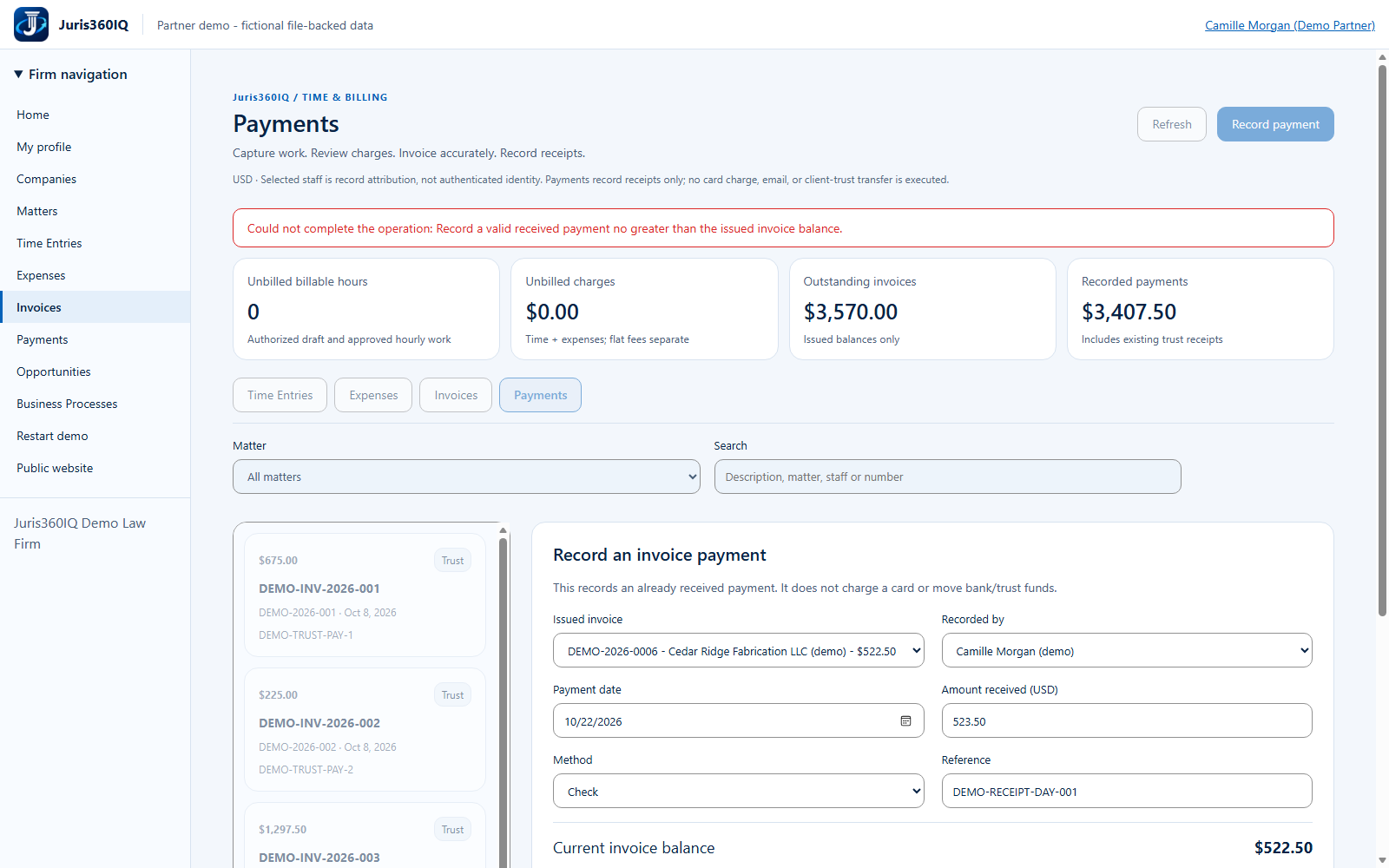
Rejected: the receipt exceeds the balance
Your action
Read the actual validation message. Change Amount received to $522.50; do not retry the same excessive amount.
Why this was rejected
Could not complete the operation: Record a valid received payment no greater than the issued invoice balance.
The action did not succeed. Follow the correction above; the next screen shows the corrected input.
Highlighted controls
- Actual overpayment rejection
- Correct the amount to $522.50
Value to the firm
Rejecting an excessive allocation helps avoid overstating invoice settlement and makes the correction explicit.
Presenter notes: purpose, business value and limitations
The rejected request did not create a receipt or move funds. The invoice balance is still $522.50. Correcting the amount is appropriate for this fictional full-payment example; a real excess receipt may need a separate approved accounting workflow, not a fabricated invoice allocation.
Business value: Rejecting an excessive allocation helps avoid overstating invoice settlement and makes the correction explicit.